Mobile Forms

Harness the power, security and ease of mobile forms to simplify inspections, surveys, investigations and more.

Streamline Mobile Inspections and Surveys

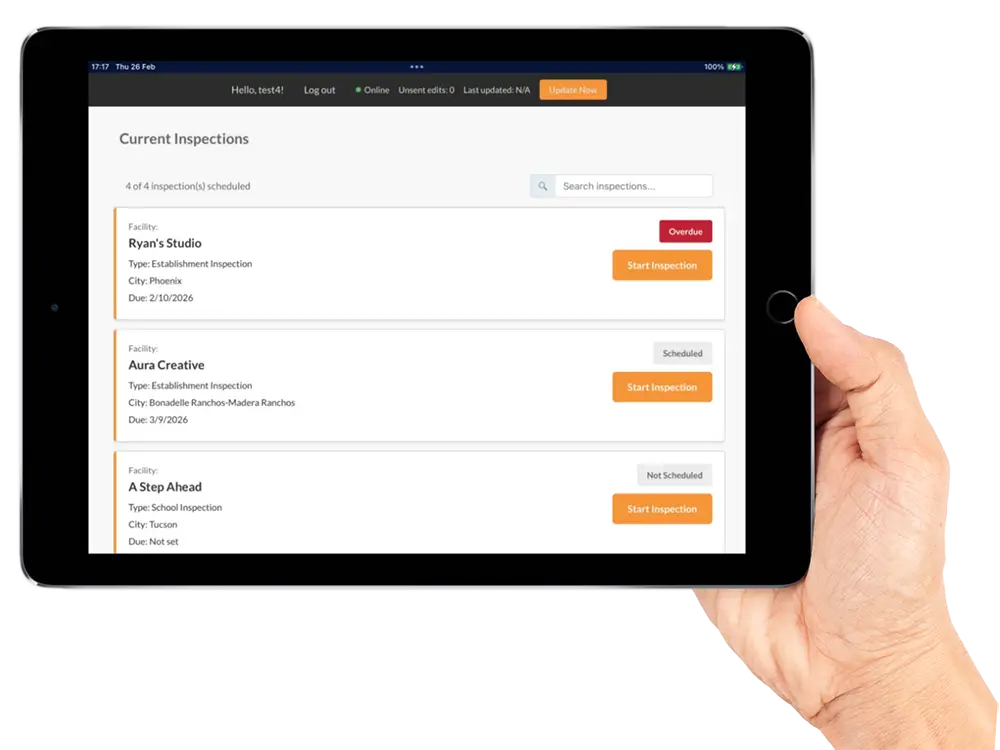
Mobile forms offer a complete, no-hassle mobile solution for your inspectors and surveyors in the field. Conduct tablet, phone and laptop-based inspections, investigations, surveys and more. Increase data accuracy and ease of use with GPS-enabled mobile forms that sync automatically with GL Suite.

Software Features

Compatible with a range of mobile device types and sizes, mobile forms offer flexibility and ease of use, supporting multiple inspectors working in the same form. Each of your inspection forms convert into an intuitive, touch-friendly mobile form with required fields, default values and advanced data validation rules. Tally inspection scores on the fly, along with other real-time calculations and reports. Tailored digital forms ask for only (and for all) the appropriate data. Collect and store signatures and images with the inspection.

Mobile forms fully integrate data into the GL Suite backend system to streamline inspections, investigations, surveys or other remote workflows. In offline mode, data saves locally onto the device, then automatically and securely transmits into GL Suite when connected. GPS-enabled technology tags photos with location information during the inspection or survey, which attach to the form and store locally on the mobile device. Mobile forms smoothly handle vast amounts of information without degradation in system performance.


How Agencies Use
Mobile Forms:

  • Protect public safety with accurate, timely inspections and investigations.
  • Save time and reduce risk with a simplified, trackable mobile workflow.
  • Equip inspectors, investigators and surveyors with mobile tools to eliminate delays and mistakes.

GL Suite’s
Mobile Forms:

  • Transforms your inspection forms into an intuitive, touch-friendly format
  • Synchronizes data from mobile devices to the GL Suite backend system
  • Powers complex forms with hundreds of fields

Secure, Automated, Portable

Mobile forms fully integrate data into the GL Suite backend system to streamline inspections, investigations, interviews or other remote activities.

Benefits

Benefits of the Mobile Forms feature include:

Digital Simplicity

A mobile workflow offers simplicity and efficiency—no more paper.

Secure and Trackable

Mobile forms track productivity and increase security with GPS location tagging.

Streamlined Results

Mobile forms automatically sync data between agency offices and your mobile device.

Pro Tips

When looking for mobile-capable software, some key features to look for include:

  • Supports the completion of forms in offline mode
  • Works with a range of mobile device types and sizes, from tablets to smartphones
  • Accepts electronic signatures and uploads photos from the mobile device to the completed form

Mobile Forms View More Resources

Mobile Inspections Help Regulators Save Time, Protect the Public

Mobile Inspections Help Regulators Save Time, Protect the Public

Regulatory inspectors spend most of their time in the field, far from the office and from the data systems that inform their work. When they carry outdated information onto a job site or when they return to headquarters with a clipboard full of handwritten notes, the...

October 30 Deadline: Federal RHTP Funds for Regulatory Systems

October 30 Deadline: Federal RHTP Funds for Regulatory Systems

October 30 Deadline: Federal RHTP Funds for Regulatory Systems The Rural Health Transformation Program (RHTP), a five-year, $50 billion federal initiative, offers state regulatory agencies funds for system modernization tied to rural health outcomes, according to the...

Modernize Inspections with Mobile Software to Save Time, Reduce Risk

Modernize Inspections with Mobile Software to Save Time, Reduce Risk

Inspectors spend most of their time in the field and often still record their findings the old-fashioned way: on paper. This outdated process slows operations as staff re-enter the same information into the agency’s system, introducing delays and increasing the risk...